System Configuration
This file contains both my install steps for archlinux and my personal literate config. I try to be as detailed as possible because I have the memory span of a goldfish.
Install steps/prereqs
Follow these steps to get to my config.
Get the latest ISO
Here is the download page. Fetch a copy.
Prepare a USB
Simplest method of all is to copy the ISO to the pen drive. Alternately, use Ventoy. If you use ventoy, you can turn on secure boot support.
Boot the ISO
Boot into the system using the ISO.
Connect to the internet
TL;DR: iwctl will open a prompt that also has
autocomplete.
device listdevice <name> set-property Powered onadapter <adapter> set-property Powered onstation <name> scanstation <name> get-networksstation <name> connect SSID
Get latest version of archinstall
pacman -Sy archinstall
Install using archinstall
In the archinstall menu:
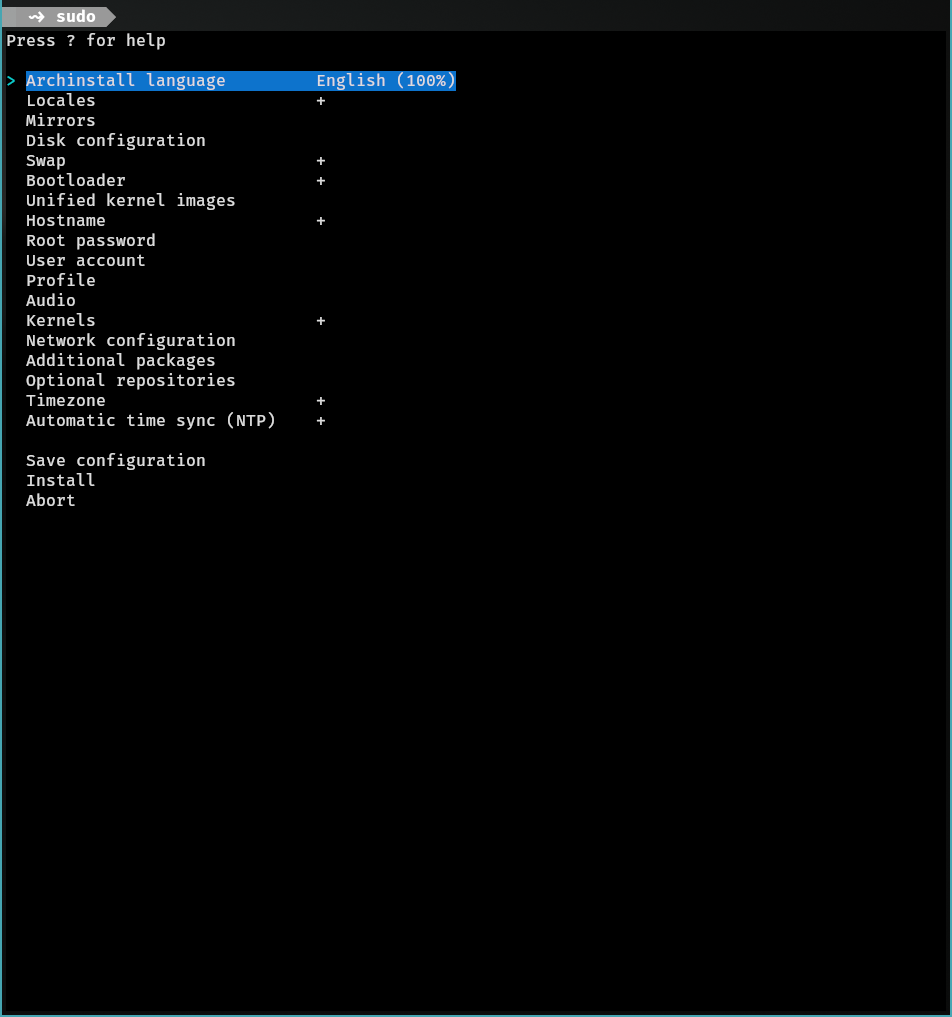
Choose global mirrors, choose disk config with btrfs and zstd enabled alongside using default subvolumes, add encryption to the btrfs partition, enable swap on zram, use systemd-boot as bootloader, enable Unified kernel images, DO NOT set a root password, add a sudo user, in profile select Desktop > Sway, select polkit to be the seat access, change greeter to sddm, select pipewire for audio, select linux kernel (hardened sucks ass), select network-manager for network config, install it, and wait.
Post install steps from ISO
Once done, use the ISO and mount the encrypted drive as follows:
cryptsetup --allow-discards --persistent open /path/to/dev root
This will allow zram setup and fstrim to be used.
After this, mount the root partition and NOT THE SUBVOLUME! This is needed for post package drama I: kernel
mount /dev/mapper/root /mnt
You should see a couple of folders (subvols actually) when you do it.
You also might want to create a separate subvolume here for the purposes of swap. Run
btrfs subvolume create /swap
btrfs filesystem mkswapfile --size 32g /swap/swapfile
swapon /swap/swapfile
Then add the following options to /etc/fstab of the
chrooted system
UUID=<same uuid as others>       /swap           btrfs           rw,relatime,compress=zstd:3,ssd,space_cache=v2,subvol=/@swap 0 0

/swap/swapfile none swap sw,pri=1 0 0
Now run
btrfs subvolume set-default /mnt/@
Now unmount and remount and check if root subvolume was properly mounted directly or not. We need to do this because of this. And we need the default later on when setting crypttab.
packages
Install git. Clone paru's repo
https://aur.archlinux.org/paru.git and cd
into it and run makepkg -si. This should install
paru. Now install neovim and run
lua literate.tangle_buffer() from CLI. You might want
to move some of the files to their respective places after you
change the username.
Then run supac rebuild to rebuild your system from scratch.
kernel stuff level 1
mkinitcpio
Now we need to make a lot of tweaks over here. First up, edit
/etc/mkinitcpio.conf and change the contents to
something like this:
MODULES=(btrfs)
BINARIES=()
FILES=()
HOOKS=(base systemd autodetect microcode keyboard modconf kms sd-vconsole block sd-encrypt filesystems fsck)
The module array is needed for the filesystem. The hooks array has some important elements:
- base: needed as a dep for fsck (since it pulls
/bin/sh, otherwise pretty useless) - systemd: actual init
- sd-vconsole: lets you type the encrypt pass
- sd-encrypt: will autodecrypt based on a fixed format file
linux.preset
Change it to this:
# mkinitcpio preset file for the 'linux' package

#ALL_config="/etc/mkinitcpio.conf"
ALL_kver="/boot/vmlinuz-linux"

PRESETS=('default' 'fallback')

#default_config="/etc/mkinitcpio.conf"
#default_image="/boot/initramfs-linux.img"
default_uki="/boot/EFI/Linux/arch-linux.efi"
default_options="--splash=/usr/share/systemd/bootctl/splash-arch.bmp"

#fallback_config="/etc/mkinitcpio.conf"
#fallback_image="/boot/initramfs-linux-fallback.img"
fallback_uki="/boot/EFI/Linux/arch-linux-fallback.efi"
fallback_options="-S autodetect"
Regenerate the uki.
I used plymouth in the past, but it slows the startup process.
Kernel cmdline and crypttab
Now, we have the fstab set up for us already by archinstall script. We need to set up the crypttab.initramfs to be able to unlock the root partition at boot.
These are the contents of
/etc/crypttab.initramfs
root /dev/path_to_dev none tpm2-device=autoFor kernel cmdline, you need a single option, quiet
(to suppress the noisy boot messages). In my case the file happened
to be /etc/kernel/cmdline, it could be anywhere
mentioned here
though.
Secure Boot using sbctl
Over here the archwiki and upstream README pretty much suffice.
systemctl --firmware-setup rebootEnter the boot menu and enter Setup Mode. This might need you to clear the secure boot keys. Exit the firmware with save and reset.
Confirm the status with sbctl status. It should show
that Setup Mode is Enabled.
Now
sbctl create-keys

sbctl enroll-keys -m -f
Make sure to run
sbctl enroll-keys -mto enroll the microsoft keys as well!!
sbctl status should say Disabled
for Setup Mode now.
Sign your bootloader and kernel with sbctl before
the reboot.
sbctl verify

sbctl sign -s file1
sbctl sign -s file2
Add an mkinitcpio post hook that signs all the enrolled binaries as well
cat << EOF > /etc/initcpio/post/uki-sbctl
#!/usr/bin/env bash
echo "signing all files"
sbctl sign-all -g
EOF
chmod +x /etc/initcpio/post/uki-sbctl
This assumes that all the files were already listed in sbctl's database.
Unlocking LUKS via TPM
Now add a second slot to the LUKS container and enroll a key to bind with TPM (make sure secure boot is on for this).
systemd-cryptenroll --tpm2-device=auto --tpm2-pcrs=7 --tpm2-with-pin=yes /dev/<device>
Rest, for any changes, follow this section.
I personally bound it to pcr7 only and use a pin alongside. I don't have much idea on what's a good combination.
/etc/crypttab.initramfs should look like this after
all that
root /dev/path_to_dev none tpm2-device=autoMeta stuff to be set up
xdg-user-dirs:xdg-user-dirs-update- Move over the rest of the stuff mentioned in the dotfiles.
- Copy over the gtk-3.0 and gtk-4.0 themes to all the flatpak config folders.
- Refresh font-cache:
fc-cache -fv - Add insults to
sudo - Run supac once to sync everything
- rebuild bat's cache:
bat cache --build - Copy over the cursor theme
~/.local/share/icons.- Download any you want. I use oreo grey cursors.
Battery, Bluetooth and Firewall
- Enable
ufw.service(defaults are mostly good)
zram setup and fstrim
Set /etc/systemd/zram-generator.conf to the single
value [zram0]
zram-generator and how to use it
Also set the kernel cmdline parameter
zswap.enabled=0
Set the config for zram in
/etc/sysctl.d/99-vm-zram-parameters.conf
vm.swappiness = 180
vm.watermark_boost_factor = 0
vm.watermark_scale_factor = 125
vm.page-cluster = 0
Enable `fstrim.timer`login fixups
Another thing to do is to add the following to
/etc/pam.d/login, so that logging in using tty also
unlocks the gnome-keyring.
auth       optional     pam_gnome_keyring.so
session    optional     pam_gnome_keyring.so auto_start
restart and enjoy
profile
append path function
This is a useful function that makes sure that only one instance
of a dir is in $PATH
append_path()  {
    case ":$PATH:" in
        *:"$1":*) ;;
        *)
            PATH="${PATH:+$PATH:}$1"
            ;;
    esac
}
Setting paths (fixup for lang toolchains)
Rest of path madness. Mostly, I just have bin for some of the scripts (such as lock and netaccess), and the last one because cargo refuses to use XDG specification for installing things.
append_path '/home/innocentzero/.local/bin/'
append_path '/home/innocentzero/bin/'
append_path '/home/innocentzero/.local/share/cargo/bin/'

export PATH

# unload the path function
unset -f append_path
Env exports
some important env exports
# important stuff
export TERM=kitty
export TERMINAL=kitty
export EDITOR=helix

# set bat as the highlighter for man
export MANPAGER="sh -c 'col -bx | bat -l man -p'"
export MANROFFOPT="-c"

# Qt decorations off
export QT_WAYLAND_FORCE_DPI=physical
export QT_WAYLAND_DISABLE_WINDOWDECORATION=1
export _JAVA_AWT_WM_NONREPARENTING=1
XDG Base Spec environment variables
explicitly define the variables
I explicitly define the variables to avoid any suprises with the applications that don't fall back to the default paths.
export XDG_CONFIG_HOME="$HOME"/.config
export XDG_CACHE_HOME="$HOME"/.cache
export XDG_DATA_HOME="$HOME"/.local/share
export XDG_STATE_HOME="$HOME"/.local/state
Bash fixups
Create the history file for bash
mkdir -p "$XDG_STATE_HOME"/bash

export HISTFILE="$XDG_STATE_HOME"/bash/history
GDB history file
export GDBHISTFILE="$XDG_DATA_HOME"/gdb/historyCursor path variables
Mostly not needing this anytime soon, but regardless, I have it here.
export XCURSOR_PATH=${XCURSOR_PATH}:~/.local/share/iconsJava fixup
export _JAVA_OPTIONS=-Djava.util.prefs.userRoot="$XDG_CONFIG_HOME"/javaMaven fixups
export MAVEN_OPTS=-Dmaven.repo.local="$XDG_DATA_HOME"/maven/repository
export MAVEN_ARGS="--settings $XDG_CONFIG_HOME/maven/settings.xml"
python fixups
export PYTHON_HISTORY=$XDG_STATE_HOME/python_history
export PYTHONPYCACHEPREFIX=$XDG_CACHE_HOME/python
export PYTHONUSERBASE=$XDG_DATA_HOME/python
inputrc location
export INPUTRC="$XDG_CONFIG_HOME"/readline/inputrcwget config file
export WGETRC="$XDG_CONFIG_HOME/wgetrc"rustup fixes
export RUSTUP_HOME="$XDG_DATA_HOME/rustup"
export CARGO_HOME="$XDG_DATA_HOME/cargo"
haskell fixes
Note
First installation of cabal using ghcup still installs in .cabal. Remove it to use the regular XDG location.
export STACK_XDG=1
export GHCUP_USE_XDG_DIRS=true
NEWT COLORS
These help set the color for nmtui (and anything else that uses newt)
export NEWT_COLORS="root=#EEEEEE,#0A0A0A border=#a9b1d6,#0A0A0A window=#a9b1d6,#0A0A0A shadow=#0A0A0A,#0A0A0A title=#a9b1d6,#0A0A0A button=#a9b1d6,#0A0A0A button_active=#7aa2f7,#0A0A0A actbutton=#7aa2f7,#0A0A0A compactbutton=#7aa2f7,#0A0A0A checkbox=#a9b1d6,#0A0A0A actcheckbox=#7aa2f7,#0A0A0A entry=#a9b1d6,#0A0A0A actentry=#7aa2f7,#0A0A0A disentry=#7aa2f7,#0A0A0A textbox=#a9b1d6,#0A0A0A acttextbox=#7aa2f7,#0A0A0A label=#a9b1d6,#0A0A0A listbox=#a9b1d6,#0A0A0A actlistbox=#7aa2f7,#0A0A0A sellistbox=#7aa2f7,#0A0A0A actsellistbox=#7aa2f7,#0A0A0A"Start up compositor
Start up niri at tty1
# set env variables for sway to work properly
if [ "$(tty)" = "/dev/tty1" ]; then

    # Make sure there's no already running session.
    if systemctl --user -q is-active niri.service; then
        echo 'A niri session is already running.'
        exit 1
    fi

    # Reset failed state of all user units.
    systemctl --user reset-failed

    # Import the login manager environment.
    systemctl --user import-environment

    # DBus activation environment is independent from systemd. While most of
    # dbus-activated services are already using `SystemdService` directive, some
    # still don't and thus we should set the dbus environment with a separate
    # command.
    if hash dbus-update-activation-environment 2> /dev/null; then
        dbus-update-activation-environment --all
    fi

    # Start niri and wait for it to terminate.
    systemctl --user --wait start niri.service

    # Force stop of graphical-session.target.
    systemctl --user start --job-mode=replace-irreversibly niri-shutdown.target

    # Unset environment that we've set.
    systemctl --user unset-environment WAYLAND_DISPLAY XDG_SESSION_TYPE XDG_CURRENT_DESKTOP NIRI_SOCKET
fi
Bin
This is for validating your network session on IITM subnet from the CLI. I write this in bash because it's helpful for arch/server installations
#ChatGPT oneshot based on browser request
set -euo pipefail

### --- CONFIGURE THESE --- ###
USERID="cs22b010"
PASSWORD=""      # If left blank, you will be prompted securely at runtime.
BUILDING="Academic"             # e.g., "Hostel" or "Academic"
DURATION="3"                  # e.g., 1, 2, 3

# Optional fields (usually blank is fine)
IP_VALUE=""
MAC_VALUE=""
ROOM_VALUE=""

# Keep cookies on disk after the run? 0 = delete (default), 1 = keep
KEEP_COOKIES=0

# Override the browser UA if you like
UA="Mozilla/5.0 (X11; Ubuntu; Linux x86_64; rv:142.0) Gecko/20100101 Firefox/142.0"
### --- END CONFIG --- ###

BASE_URL="https://netaccess.iitm.ac.in"
COOKIE_JAR="$(mktemp -t netaccess_cookies.XXXXXX)"

cleanup() {
  if [[ "$KEEP_COOKIES" -eq 0 && -f "$COOKIE_JAR" ]]; then
    rm -f "$COOKIE_JAR"
  fi
}
trap cleanup EXIT

# Basic sanity checks
[[ -n "$USERID" ]] || { echo "Error: USERID is empty. Edit the script and set it." >&2; exit 2; }
[[ -n "$BUILDING" ]] || { echo "Error: BUILDING is empty. Edit the script and set it." >&2; exit 2; }
[[ -n "$DURATION" ]] || { echo "Error: DURATION is empty. Edit the script and set it." >&2; exit 2; }

# Prompt for password if not set
if [[ -z "${PASSWORD:-}" ]]; then
  read -r -s -p "Password for $USERID: " PASSWORD
  echo
fi

# Common curl headers (matching your captured requests closely)
CURL_COMMON=(
  -H "User-Agent: $UA"
  -H 'Accept: text/html,application/xhtml+xml,application/xml;q=0.9,*/*;q=0.8'
  -H 'Accept-Language: en-US,en;q=0.5'
  --compressed -k
  --silent --show-error
)

echo "[1/3] Logging in as $USERID..."
curl "${CURL_COMMON[@]}" -L \
  -c "$COOKIE_JAR" \
  -e "$BASE_URL/login" \
  -H "Origin: $BASE_URL" \
  -H 'Content-Type: application/x-www-form-urlencoded' \
  --data-urlencode "username=$USERID" \
  --data-urlencode "password=$PASSWORD" \
  "$BASE_URL/login" > /dev/null

# Check we received a 'session' cookie
if ! grep -q '^#HttpOnly_' "$COOKIE_JAR" && ! grep -q $'\tsession\t' "$COOKIE_JAR"; then
  echo "Login may have failed (no 'session' cookie found). Check credentials." >&2
  exit 1
fi

echo "[2/3] Opening Approve page..."
curl "${CURL_COMMON[@]}" \
  -b "$COOKIE_JAR" \
  -e "$BASE_URL/dashboard" \
  "$BASE_URL/approve" > /dev/null

echo "[3/3] Submitting approval (building='$BUILDING', duration='$DURATION')..."
APPROVE_HTML="$(mktemp -t netaccess_approve_resp.XXXXXX.html)"
curl "${CURL_COMMON[@]}" \
  -b "$COOKIE_JAR" \
  -e "$BASE_URL/approve" \
  -H "Origin: $BASE_URL" \
  -H 'Content-Type: application/x-www-form-urlencoded' \
  -X POST \
  --data-urlencode "ip=$IP_VALUE" \
  --data-urlencode "username=" \
  --data-urlencode "building=$BUILDING" \
  --data-urlencode "duration=$DURATION" \
  --data-urlencode "mac=$MAC_VALUE" \
  --data-urlencode "room=$ROOM_VALUE" \
  "$BASE_URL/approve" > "$APPROVE_HTML"

if grep -qiE 'approved|success|enabled|internet.*active' "$APPROVE_HTML"; then
  echo "✅ Approval appears successful."
else
  echo "ℹ️  Submitted. Couldn’t confirm success text—showing last lines for context:"
  tail -n 20 "$APPROVE_HTML"
fi

if [[ "$KEEP_COOKIES" -eq 1 ]]; then
  echo "Cookie jar kept at: $COOKIE_JAR"
else
  rm -f "$APPROVE_HTML"
fi
Fastfetch
// Note that you must replace the image path to an existing image to display it.
{
"$schema": "https://github.com/fastfetch-cli/fastfetch/raw/dev/doc/json_schema.json",
"logo": {
"source": "~/.config/fastfetch/logo.txt",
},
"display": {
"separator": " "
},
"modules": [
{
"type": "custom", // HardwareStart
// {#1} is equivalent to `\u001b[1m`. {#} is equivalent to `\u001b[m`
"format": "┌─────────── {#1}Hardware Information{#} ───────────┐"
},
{
"type": "host",
"key": " "
},
{
"type": "cpu",
"key": " "
},
{
"type": "gpu",
"key": " "
},
{
"type": "disk",
"key": " "
},
{
"type": "memory",
"key": " "
},
{
"type": "swap",
"key": " "
},
{
"type": "display",
"key": " "
},
{
"type": "brightness",
"key": " "
},
{
"type": "battery",
"key": " "
},
{
"type": "poweradapter",
"key": " "
},
{
"type": "bluetooth",
"key": " "
},
{
"type": "sound",
"key": " "
},
{
"type": "gamepad",
"key": " "
},
{
"type": "custom", // SoftwareStart
"format": "├─────────── {#1}Software Information{#} ───────────┤"
},
{
"type": "title",
"key": " ",
"format": "{1}@{2}"
},
{
"type": "os",
"key": " " // Just get your distro's logo off nerdfonts.com
},
{
"type": "kernel",
"key": " ",
"format": "{1} {2}"
},
{
"type": "lm",
"key": " "
},
{
"type": "de",
"key": " "
},
{
"type": "wm",
"key": " "
},
{
"type": "shell",
"key": " "
},
{
"type": "terminal",
"key": " "
},
{
"type": "terminalfont",
"key": " "
},
{
"type": "theme",
"key": " "
},
{
"type": "icons",
"key": " "
},
{
"type": "wallpaper",
"key": " "
},
{
"type": "packages",
"key": " "
},
{
"type": "uptime",
"key": " "
},
{
"type": "media",
"key": " "
},
{
"type": "localip",
"key": " ",
"compact": true
},
{
"type": "wifi",
"key": " ",
"format": "{4}" // ssid
},
{
"type": "locale",
"key": " "
},
{
"type": "custom", // InformationEnd
"format": "└────────────────────────────────────────────┘"
},
{
"type": "colors",
"paddingLeft": 2,
"symbol": "circle"
}
]
} ▄
▟█▙
▟███▙
▟█████▙
▟███████▙
▂▔▀▜██████▙
▟██▅▂▝▜█████▙
▟█████████████▙
▟███████████████▙
▟█████████████████▙
▟███████████████████▙
▟█████████▛▀▀▜████████▙
▟████████▛ ▜███████▙
▟█████████ ████████▙
▟██████████ █████▆▅▄▃▂
▟██████████▛ ▜█████████▙
▟██████▀▀▀ ▀▀██████▙
▟███▀▘ ▝▀███▙
▟▛▀ ▀▜▙